Press record
One tap starts recording and brings up the level meter and timer. You can pause and resume whenever you like, and you don't even need to sign in before you record.
 KolWrite
Theme
Free on the App Store
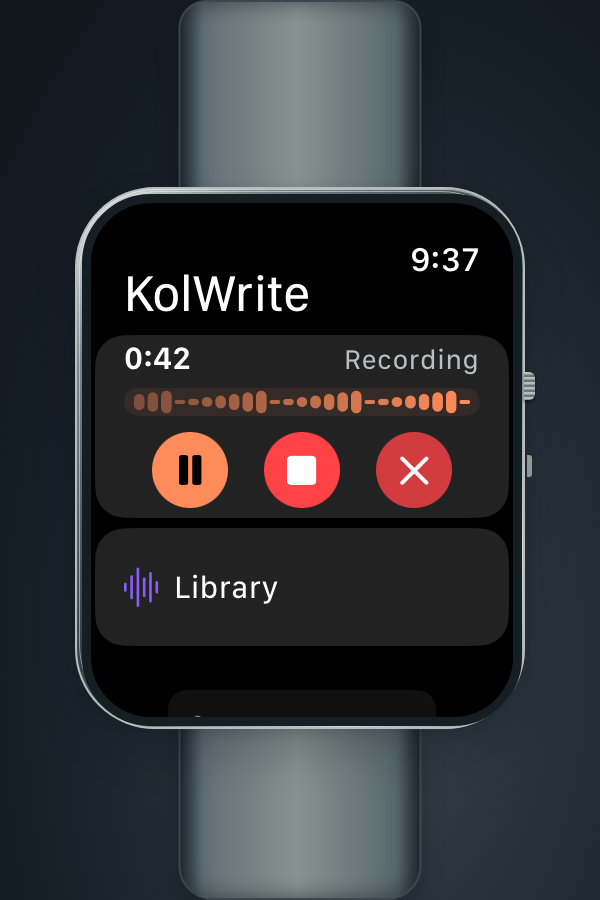
KolWrite Watch Recorder runs entirely on your watch, so there is nothing to install on your phone and you can leave the phone behind. Tap record and start talking. The watch uploads the audio to your KolWrite account over its own Wi-Fi or mobile connection, and sends the transcript back to your wrist so you can read along while you listen.
Free on the App Store for watchOS 10 or later. The Wear OS app for Android watches is not out yet.
From wrist to transcript
Your watch handles recording and playback, while your KolWrite account does the rest. The watch doesn't transcribe the audio itself, and it never hands the job off to a paired phone.
One tap starts recording and brings up the level meter and timer. You can pause and resume whenever you like, and you don't even need to sign in before you record.
The app keeps recording when the screen goes dark or you switch to something else. If a phone call interrupts or your audio switches to another device, the recording picks right back up afterward. If the watch is running low on storage, the app stops on its own and lets you know before space runs out.
Your watch sends the audio straight to your KolWrite account over its own Wi-Fi or mobile connection. Transcription, speaker separation, and summaries all happen in the cloud.
You'll get a notification as soon as the text is ready. You can read through it quietly, or play the audio and watch the words highlight in time. Tap any timestamp to jump straight to that moment.
Built for the watch
Each screen does one quick job, so you aren't stuck holding your arm up.
This is a watch-only app. You don't need to install anything on your phone or keep a phone nearby.
The app only records after you press the button. It never listens in the background or runs all day.
Listen to files saved on the watch or stream recordings from your account. You can scrub through the timeline, skip fifteen seconds forward or back, and play audio through AirPods or another AirPlay device.
Open any recording to listen to the audio, read the text on its own, or follow the text while the audio plays. You can also request a summary, and choose whether the playback highlight moves word by word or segment by segment.
When the cloud separates different speakers, their names appear next to their lines right on the watch.
Add shortcuts to your watch face to start recording, open the assistant, run your shortcuts, or take a quick voice note. You'll also get a notification on your wrist when a transcript finishes.
Using recordings without sound
Working with recorded speech on a small screen can be frustrating. These features are for people who are Deaf or hard of hearing, anyone who prefers to see the words in writing, and people who want to review something at their own speed.
You can open and read the full timed transcript, including speaker names when available, without ever hitting play.
Follow the playback highlight word by word or segment by segment, and tap any timestamp to jump directly to that part of the recording.
Controls for recording, playback, transcripts, progress, and signing in all include VoiceOver labels, values, or hints.
The app works in English, Hebrew, Arabic, Spanish, French, Russian, and German, with full right-to-left layouts for Hebrew and Arabic. You pick the language inside the app, independent of your watch's system language.
Text adjusts to your system font size, and the app supports both light and dark modes. Status indicators use words and icons so you don't have to rely on color alone.
It does not provide live captioning, and automated text has errors. To use the cloud steps, you will need an account, a network connection, the right plan, and credits.
One KolWrite account
Anything you record on the watch goes to your account, making it available on your other screens too. Here is what is ready to use today.
Watch transcription questions
How the Apple Watch app works, where the work happens, and what is not released yet.
Yes. You can download KolWrite Watch Recorder for free on the App Store if you have watchOS 10 or later. We haven't released the Wear OS version for Android watches yet.
No. The app runs entirely on the watch without an iPhone companion app. It connects to your KolWrite account directly over the watch's Wi-Fi or cellular connection.
No. The watch handles recording and playback, while the cloud handles transcription, translation, and summaries. Because of that, those features require an internet connection and account credits. If you record offline, the transcript will show up after the audio uploads.
No. It only records when you start a recording yourself. There is no always-on listening, wake word, or live captioning.
You can read transcripts, generate summaries, jot down and pin quick notes, check your Google Calendar, or ask the assistant a question.
Available now
Download KolWrite Watch Recorder for free on the App Store. Record straight from your wrist and read the transcript later on any device.